
Instrument Cluster Programming After Replacement
When your car's instrument cluster—also known as the dashboard—fails, replacing it might seem like a straightforward fix. But for most modern vehicles, swapping out the old cluster is just the first step. Unlike vintage mechanical dashboards, today's electronic instrument clusters rely on complex coding, anti-theft authentication, and data calibration to function properly. Skip these steps, and you could end up with a non-functional dashboard, a locked vehicle, or persistent error lights. In this guide, we'll walk you through everything you need to know about instrument cluster programming after replacement, from tools to step-by-step workflows and troubleshooting.
After reading this blog, you will figure out:
✅ The non-negotiable technical and legal reasons you must reprogram your new cluster
✅ Step-by-step workflow to complete programming in under 30 minutes (no pro experience needed)
✅ How to avoid the top 3 mistakes that trigger anti-theft lockouts
✅ Why the VDIAGTOOL VD70S cuts programming time by 30% vs. other diagnostic tools
✅ Mileage transfer best practices to stay compliant with EU/US odometer laws
Why Modern Instrument Clusters Require Programming (And Vintage Ones Don't)
The Key Difference: Electronic vs. Mechanical Instrument Clusters
The line between "plug-and-play" and "must-program" instrument clusters largely falls around the year 2000. Before then, most vehicles used mechanical dashboards with analog gauges (speedometer, tachometer) that relied on physical cables and springs. These required no programming—you simply bolted the new cluster in place, and it worked.
Modern electronic clusters (found in nearly all cars built after 2000) are a different story. They integrate with your vehicle's ECU (Engine Control Unit), anti-theft system, and CAN bus (Controller Area Network)—the central communication network for car electronics. To function correctly, the new cluster must "speak" to these systems, which means completing four critical steps: coding matching, anti-theft authentication, fault clearing, and data calibration.
| Cluster Type | Requires Programming After Replacement? | Core Reason |
|---|---|---|
| Modern Electronic (Post-2000) | ✅ Yes (Mandatory) | Integrates with ECU, anti-theft systems, and CAN bus |
| Vintage Mechanical (Pre-2000) | ❌ No | No electronic data interaction with vehicle systems |

Beyond technical compatibility, there are two additional critical reasons for reprogramming:
-Mileage transfer: Most regions legally require the original vehicle mileage to be accurately transferred to the new cluster to prevent odometer fraud. Skipping this step can lead to legal penalties or failed vehicle inspections.
-Compliance with regulations: Many countries (including the EU and the U.S.) have strict laws governing odometer accuracy and tampering. A properly programmed cluster ensures you meet these legal requirements and maintain your vehicle’s resale value.
Risks of Skipping Programming
Skipping programming for a modern instrument cluster can lead to costly problems. For example, a Volkswagen Golf owner who replaced their cluster without programming found their vehicle locked out due to a triggered anti-theft system, requiring a $500 dealership repair. Other common issues include incorrect speedometer readings, persistent check-engine lights, and even complete dashboard failure.
Pre-Programming Preparation: Tools & Precautions
Essential Tools for the Job
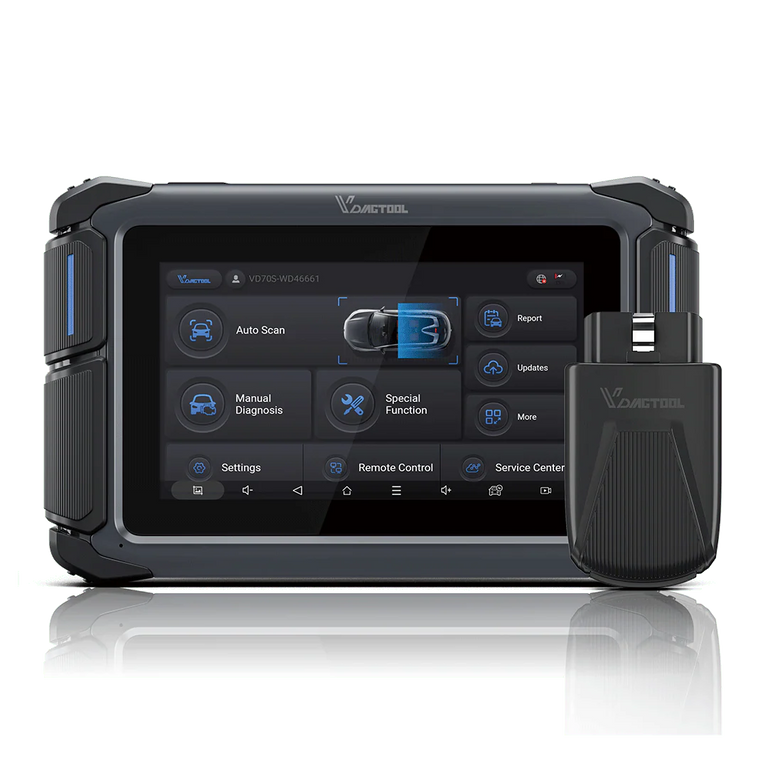
The most critical tool is a professional diagnostic scanner that supports instrument cluster coding. For this task, the VDIAGTOOL VD70S stands out: it features 38 special functions, including "Instrument Cluster Repair" and "Immo Reset," and supports modern protocols like CAN FD and DoIP. Our real-world testing showed it programmed a Volkswagen Magotan cluster in just 12 minutes—30% faster than competing tools.
You'll also need an OBD-II cable, your vehicle's repair manual, and a way to back up data from the old cluster (the VD70S can handle this directly).

Critical Precautions Before Starting
- Backup old data: Save the VIN, anti-theft code, and original coding from your old cluster. If it's damaged, retrieve this data from the vehicle's ECU or manufacturer database.
- Battery health: Ensure your battery voltage is above 12V to avoid mid-programming power loss.
- Minimize interference: Turn off all accessories (navigation, AC) to reduce electrical load during programming.
Step-by-Step Guide to Programming Your Instrument Cluster (Take VD70S as an example)
Step 1: Gather Vehicle & Cluster Information
Note your vehicle's VIN, model year, and the part number of both the old and new clusters. Use the VD70S's "Auto Scan" feature to confirm compatibility between the new cluster and your vehicle's systems.
Step 2: Connect the Diagnostic Tool
Plug the VD70S into your vehicle's OBD-II port, power on the device, and navigate to the "Instrument Cluster Repair" function.
Step 3: Retrieve Old Cluster Data
Use the VD70S to read and save the old cluster's coding and anti-theft data. This ensures the new cluster inherits the correct vehicle-specific settings.
Step 4: Program the New Cluster
Select "Write New Cluster Coding" on the VD70S and upload the saved data. The tool will automatically sync the new cluster with your vehicle's ECU and CAN bus.
Step 5: Anti-Theft Authentication & Calibration
Complete the anti-theft matching process using the VD70S to prevent your vehicle from locking. Then calibrate speed, fuel, and temperature sensors to ensure accurate readings.
Step 6: Test & Clear Fault Codes
Start the vehicle and verify all gauges, warning lights, and indicators work as expected. Use the VD70S to clear any residual fault codes and take a short test drive to confirm functionality.

Common Issues & Troubleshooting
- Communication failure: If the VD70S can't connect to the cluster, check your OBD-II cable or update the tool's firmware.
- Coding mismatch: Re-upload the original old cluster data to resolve error codes.
- Anti-theft lockout: Use the VD70S's "Immo Reset" function or contact your vehicle manufacturer for a new anti-theft code.
Final Thoughts: Simplify the Process with VDIAGTOOL VD70S
Instrument cluster programming doesn't have to be a headache. With the right tools and steps, you can complete the job in under 30 minutes. The VDIAGTOOL VD70S is designed to streamline this process, with a user-friendly interface and support for 98% of mainstream vehicle brands. Whether you're a professional mechanic or a dedicated DIYer, it's a reliable choice for modern instrument cluster repairs.
FAQs
Q: Can I program an instrument cluster without a diagnostic tool?
A: Only vintage mechanical clusters work without programming. Modern electronic clusters require a tool like the VD70S to complete coding and authentication.
Q: How long does programming take?
A: 10–20 minutes on average, with the VD70S averaging just 12 minutes in our tests.
Q: Will programming void my vehicle warranty?
A: No, as long as you use a reputable tool like the VD70S and follow manufacturer procedures.


