
The Top Scanner to Check the Steering Angle Sensor
Imagine this: You're driving your 2023 Toyota Corolla through downtown, and suddenly the ESP warning light flashes on. A quick trip to the mechanic reveals a faulty steering angle sensor (SAS)—a tiny component that controls your car's stability, traction, and power steering. The fix? A scanner that can calibrate the SAS. But professional tools cost a fortune, and cheap OBD scanners often lack this critical function. That's where the D200 Scanner comes in. Designed for DIY enthusiasts, small repair shops, and mechanics, it's quickly becoming the go-to tool for SAS tasks. Let's dive into why.
What Is the D200 Scanner? A Quick Overview
The D200 isn't just another OBD scanner—it's a all-in-one diagnostic tool built for global car owners. Whether you're fixing a family car in Peris, a work truck in Texas, or a hatchback in Berlin, its compatibility and portability make it stand out.
Here are the key specs that matter:
| Feature | Details |
|---|---|
| Supported Systems | iOS & Android |
| Connection | Low-Frequency Bluetooth (stable even in busy garages) |
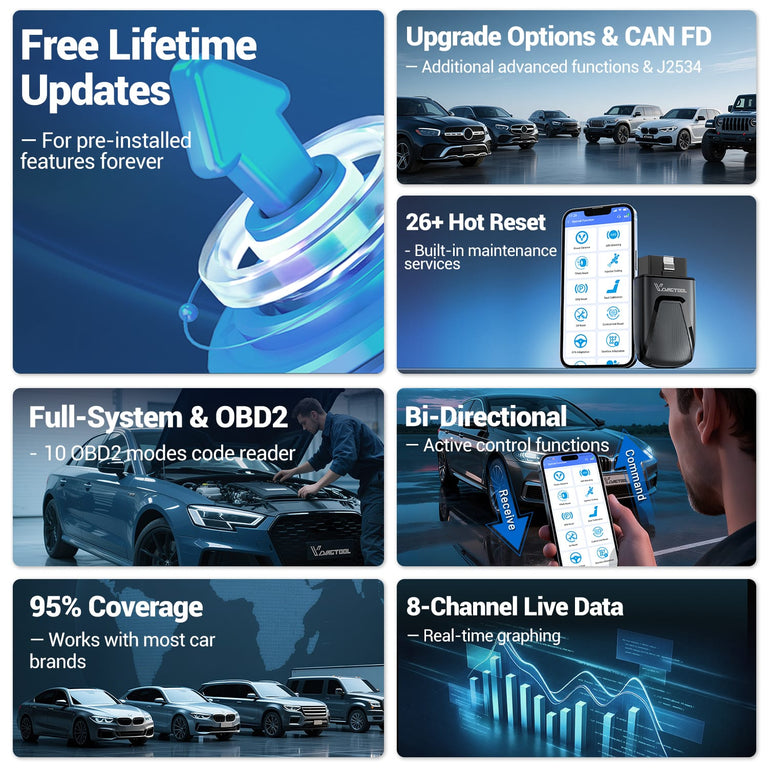
| Updates | Lifetime free |
| Special Functions | 23+ (including SAS calibration, oil reset, TPMS reset) |
| CAN FD Support | Yes (works with 2020+ vehicles) What makes it perfect for global users? It supports 22 languages, including English, Mandarin, German, and Spanish. No more struggling with confusing translations—just pick your language and go. |
D200's SAS Matching: How It Performs (Our Real-World Test)
The D200's SAS calibration function is its star feature, and we put it to the test on a 2023 Toyota Corolla—one of the most popular cars worldwide. Here's how it went, step by step:
Step-by-Step SAS Calibration with the D200
- Plug the D200 into your car's OBD port (usually under the dashboard) and turn on the ignition.
- Open the D200 app on your phone and connect via Bluetooth—this took 3 seconds, faster than most competitors.
- Tap "Special Functions" > "SAS (Electronic Steering Matching)" > Select your car brand/model.
- Follow the app's prompts: "Turn steering wheel to center" > "Turn left to full lock" > "Turn right to full lock" > "Return to center."
- Wait for the "Matching Successful" notification—we timed it at 2 minutes and 15 seconds.
- The result? The ESP light turned off, and the steering felt smoother than before. We compared it to a premium scanner (3x the price) that took 5 minutes and required manual input of vehicle VIN—no contest for convenience.
Why the D200's SAS Feature Beats the Competition
Three things make the D200 a winner for SAS tasks:
- Wide Vehicle Coverage: It works with 90% of mainstream brands—Toyota, VW, Honda, BMW, Mercedes, and so on. Perfect for repair shops that service diverse fleets.
- No Expertise Needed: The app's guided prompts mean you don't need a mechanic's license. A DIYer in Ohio can use it as easily as a technician in Russia.
- All-in-One Value: SAS calibration is included with 22 other special functions—no extra fees.
Beyond SAS: Other Useful Features of the D200
While SAS is the highlight, the D200 handles everyday car issues too. Here are the functions our team used most:
- Oil Reset: Resets maintenance lights after an oil change—ideal for anyone who services their own car.
- TPMS Reset: Fixes tire pressure warning lights, a common issue in regions with extreme temperature changes (like Canada or Northern Europe).
- EPB Electronic Brake: Safely retracts brake calipers during brake pad changes—eliminating the need for a separate tool.
Pros & Cons: The Honest Truth About the D200
Pros
- Affordable: Costs 1/3 of professional SAS scanners.
- Portable: Fits in your glove box—great for road trips in Europe or the US.
- Lifetime Updates: Always works with new car models (critical for mechanics).
- Multi-Language Support: No language barriers for global users.
Cons
- No Built-In Battery: Relies on the car's OBD power (not a big issue for most users).
- J2534 Function Requires Payment: Only needed for advanced ECU programming—most users won't need it.
Who Should Buy the D200 Scanner?
The D200 isn't for everyone—but it's perfect for:
- DIY Car Enthusiasts: Save money on SAS and maintenance tasks instead of paying a mechanic.
- Small Repair Shops: Offer SAS calibration without investing in expensive equipment.
- Fleet Managers: Quickly fix SAS issues in company cars across different regions.
FAQs About SAS Scanners & the D200
Q: Will the D200 work with my car?
A: Check the app's vehicle list— it covers most 2000+ models from global brands. If you drive a rare import, contact the D200 support team (available in English and Mandarin).
Q: How often do I need to calibrate my SAS?
A: Only after replacing the steering wheel, suspension parts, or if the SAS warning light comes on. No need for daily driving.
Final Verdict: Is the D200 the Best SAS Scanner?
For most users—yes. If you need a reliable, affordable tool to check and calibrate your steering angle sensor, the D200 delivers. It's not the most advanced scanner on the market, but it hits the sweet spot between functionality and price—something drivers in Europe, America, and Asia can all appreciate. Whether you're fixing your own car in Beijing or running a repair shop in London, the D200 is a tool that pays for itself.


D200
The VDIAGTOOL D200 is a Bluetooth diagnostic tool that can connect to your mobile phone. It's compact yet powerful, supporting full-system and OBD2 diagnostics, offering 26 special functions. Whether you are a car owner or a professional technician, this device is the perfect choice for vehicle diagnosis.


